The protocol,
in chapters.
Everything you need to integrate Open Agent ID into your agent or app. Read the chapters that matter to you. The rest will be there when you need them.
Register your first agent in 3 steps:
# Get a challenge
curl -X POST https://api.openagentid.org/v1/auth/challenge \
  -H "Content-Type: application/json" \
  -d '{"wallet_address": "0xYourWallet"}'

# Sign the challenge with MetaMask, then:
curl -X POST https://api.openagentid.org/v1/auth/wallet \
  -H "Content-Type: application/json" \
  -d '{"challenge_id": "...", "wallet_address": "0x...", "signature": "0x..."}'
# → { "token": "oaid_..." }curl -X POST https://api.openagentid.org/v1/agents \
-H "Authorization: Bearer oaid_..." \
-H "Content-Type: application/json" \
-d '{"name": "my-agent", "public_key": "<base64url Ed25519 key>"}'
# → { "did": "did:oaid:base:0x...", "credit_score": 100 }curl https://api.openagentid.org/v1/credit/did:oaid:base:0x...
# → { "credit_score": 100, "level": "standard", "verified": false }Or use the SDKs: pip install open-agent-id · npm i @open-agent-id/sdk · cargo add open-agent-id
Common integration patterns using the SDKs.
The most common integration — gate access based on an agent's trust level.
from agent_id import RegistryClient

client = RegistryClient()
credit = await client.get_credit("did:oaid:base:0x...")
if credit["credit_score"] >= 300:
print("Verified agent — allow access")import { RegistryClient } from "@open-agent-id/sdk";
const client = new RegistryClient();
const credit = await client.getCredit("did:oaid:base:0x...");
if (credit.credit_score >= 300) {
console.log("Verified agent");
}Agents sign outgoing requests with Ed25519. Verify the signature to authenticate the sender.
X-Agent-DID: did:oaid:base:0x...
X-Agent-Timestamp: 1711036800
X-Agent-Nonce: a3f1b2c4d5e6f7089012abcd
X-Agent-Signature: <base64url Ed25519 signature>
from agent_id import RegistryClient

client = RegistryClient()

# Extract headers from the incoming request
did = request.headers["X-Agent-DID"]
signature = request.headers["X-Agent-Signature"]
timestamp = request.headers["X-Agent-Timestamp"]

# Verify against the registry
valid = await client.verify_signature(
    did=did,
    domain="oaid-http/v1",
    payload=f"{request.method}|{request.url}|{timestamp}",
    signature=signature,
)
if valid:
print(f"Authenticated: {did}")import { RegistryClient } from "@open-agent-id/sdk";
const client = new RegistryClient();
const did = req.headers["x-agent-did"];
const signature = req.headers["x-agent-signature"];
const timestamp = req.headers["x-agent-timestamp"];
const valid = await client.verifySignature(
did,
"oaid-http/v1",
`${req.method}|${req.url}|${timestamp}`,
signature,
);
if (valid) {
console.log("Authenticated:", did);
}from agent_id import RegistryClient, sign_agent_auth
client = RegistryClient()
# Sign with your agent's Ed25519 key
headers = sign_agent_auth("did:oaid:base:0xSender...", private_key)
# Use headers for agent-authenticated API calls
# (messaging requires X-Agent-DID, X-Agent-Timestamp, X-Agent-Nonce, X-Agent-Signature)import { RegistryClient, signAgentAuth } from "@open-agent-id/sdk";
const client = new RegistryClient();
// Sign with your agent's Ed25519 key
const headers = signAgentAuth("did:oaid:base:0xSender...", privateKey);
// Use headers for agent-authenticated API calls
// (messaging requires X-Agent-DID, X-Agent-Timestamp, X-Agent-Nonce, X-Agent-Signature)Once you've registered your agent, follow these steps to start using it:
The registration page provides a one-time download of your agent credential (.json). This file contains your DID, keys, and API endpoint. Save it securely.
cargo install oaid-mcp-server
Or download the pre-built binary from GitHub releases.
oaid-mcp-server encrypt ~/Downloads/mybot-a1b2c3d4.credential.json
# Enter a passphrase → creates ~/.oaid/mybot-a1b2c3d4.credential.enc
# Delete the plaintext after encryption.
Add to your Claude Desktop config (claude_desktop_config.json):
{
  "mcpServers": {
    "oaid": {
      "command": "oaid-mcp-server",
      "env": {
        "OAID_CREDENTIAL_FILE": "~/.oaid/mybot-a1b2c3d4.credential.enc"
      }
    }
  }
}Your AI agent now has these tools:
- oaid_whoami — Check your agent's identity
- oaid_sign_request — Sign HTTP requests
- oaid_check_credit — Check any agent's credit score
- oaid_lookup_agent — Look up agent info
- oaid_send_message — Send messages to other agents
- oaid_get_messages — Read your messages
- oaid_send_encrypted_message — Send end-to-end encrypted messages
- oaid_list_agents — List your local agent credentials
Register multiple agents, each gets its own credential file. Set OAID_CREDENTIAL_FILE to the one you want to use.
Share your referral link to earn $1 USDC + 1 credit point for each verified referral. Find your link at GET /v1/referral/{did}.
Every agent has a credit score that determines trust level:
- Flagged (below 60) — restricted access, can appeal for $50
- Basic (60–149) — default after registration
- Standard (150–299) — unlocked via referrals or time
- Verified (300+) — pay $10 to verify, full privileges
Score formula: 100 (base) + 200 (verified) + referrals − reports × 20
Base URL: https://api.openagentid.org/v1
| Endpoint | Auth | Description |
|---|---|---|
| POST /auth/challenge | — | Get wallet auth challenge |
| POST /auth/wallet | — | Verify signature, get bearer token |
| POST /agents | Wallet | Register new agent |
| GET /agents/{did} | — | Look up agent by DID |
| GET /agents | Wallet | List agents owned by authenticated wallet |
| PATCH /agents/{did} | Wallet/Agent | Update agent metadata |
| DELETE /agents/{did} | Wallet | Revoke agent |
| PUT /agents/{did}/key | Wallet | Rotate Ed25519 key |
| POST /agents/{did}/deploy-wallet | Wallet | Deploy on-chain wallet |
| GET /credit/{did} | — | Get credit score |
| POST /credit/verify | Wallet | Pay $10 USDC to verify |
| POST /credit/report | Agent | Report an agent ($1 USDC, tiered access) |
| POST /credit/appeal | Wallet | Appeal a flagged status ($50 USDC) |
| POST /credit/flag | Agent | Flag agent for review |
| GET /referral/{did} | — | Get referral stats |
| GET /pricing | — | Get current fee schedule |
| POST /verify | — | Verify Ed25519 signature |
| POST /messages | Agent | Send message to agent |
| GET /messages | Agent | Get messages |
| DELETE /messages/{id} | Agent | Delete message |
Full OpenAPI spec: api.yaml ↗
How the
protocol works.
From local key generation to on-chain anchoring and agent-to-agent trust — visualized step by step.
How registration works
The owner first authenticates with their Ethereum wallet to get a verified identity. Then the agent generates an Ed25519 keypair locally (via SSH or SDK) and registers the public key. Every agent is traceable to a real, verified wallet owner.
Think of it like opening a bank account: you show your ID first (wallet signature), then deposit your unique stamp pattern (public key). No anonymous accounts — every agent has a verified owner who can be held accountable.
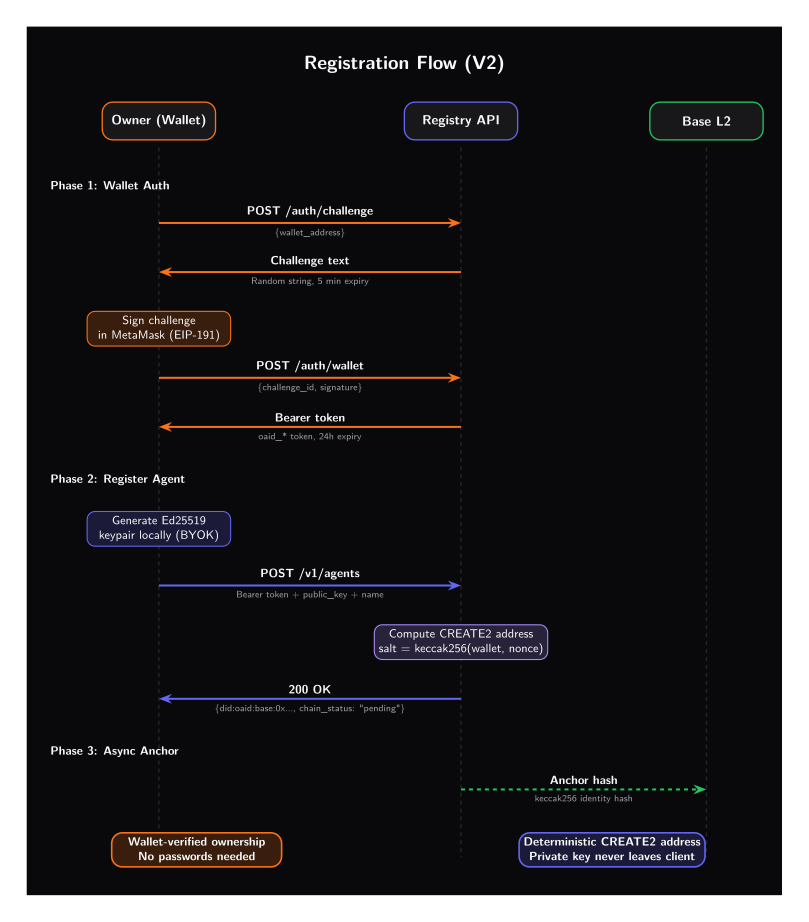
How wallet authentication works (and why it can't be faked)
Every agent owner must prove their identity with an Ethereum wallet. Here's exactly what happens under the hood — no trust required, just math.
The registry generates a random, one-time string (e.g., "Sign this to authenticate: a8f3e2…") and sends it to the owner's browser.
Like a bank teller saying: "Please write this specific sentence on a piece of paper and sign it." The sentence is random and different every time, so no one can prepare a forgery in advance.
The owner's wallet (e.g., MetaMask) pops up asking them to sign the challenge string. The wallet uses the owner's Ethereum private key to produce a cryptographic signature — the private key never leaves the device.
MetaMask shows a popup: "This site wants you to sign a message." You click "Sign" — that's it. Your private key never leaves your device, never goes to the internet. It's like signing a document in a sealed room: only the signed document comes out, the pen stays inside.
The registry receives the signature and uses Ethereum's ecrecover function to mathematically derive the signer's wallet address from the signature alone — no secret needed. If the derived address matches the claimed address, the owner is verified.
Here's the clever part: the registry doesn't need your private key to verify you. Using math (ecrecover), it can look at your signature and figure out exactly which wallet address produced it. It's like a forensic handwriting expert who can identify the writer just from the signature — impossible to fake, no secrets exchanged.
Nothing secret is ever sent over the network. Your private key stays on your device at all times.
Each challenge is random and one-time. Even if someone intercepts a signature, they can't reuse it for a different challenge.
MetaMask pops up, you click "Sign", you're verified. Same flow used by OpenSea, Uniswap, and thousands of dApps.
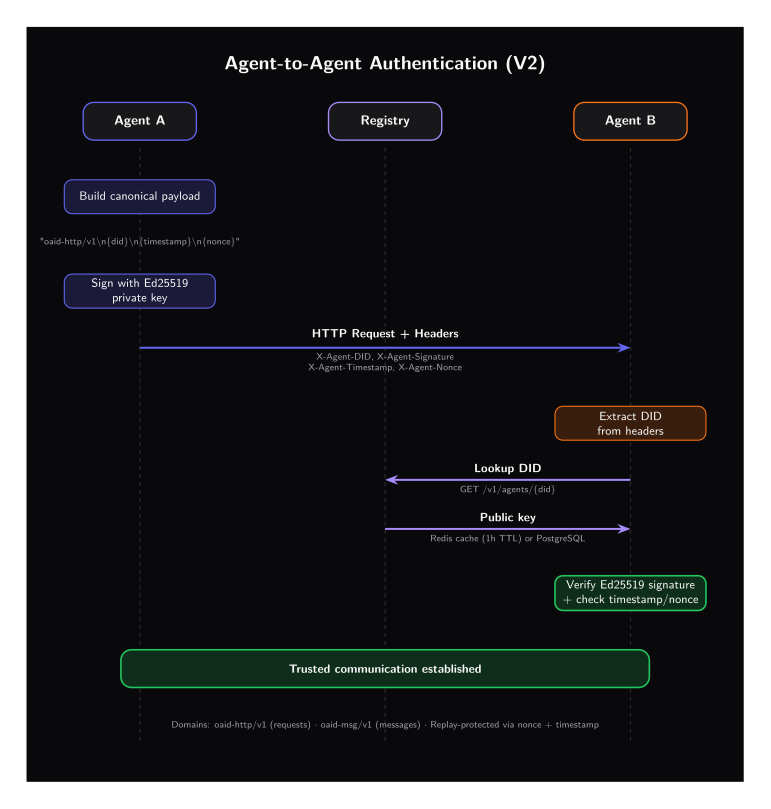
Agent-to-agent authentication
Agents sign requests with their private key and include identity headers. The receiving agent looks up the sender's public key from the registry and verifies the signature locally in under 0.1ms.
When Agent A sends a message to Agent B (or calls an MCP server tool), it stamps the message with its private key. The receiver checks the stamp against the registry. If it matches, the message is genuine. No shared passwords needed — nothing secret ever travels over the network. Each request includes a timestamp and a unique nonce (one-time random number) to prevent replay attacks: even if someone intercepts a message, they can't reuse it.
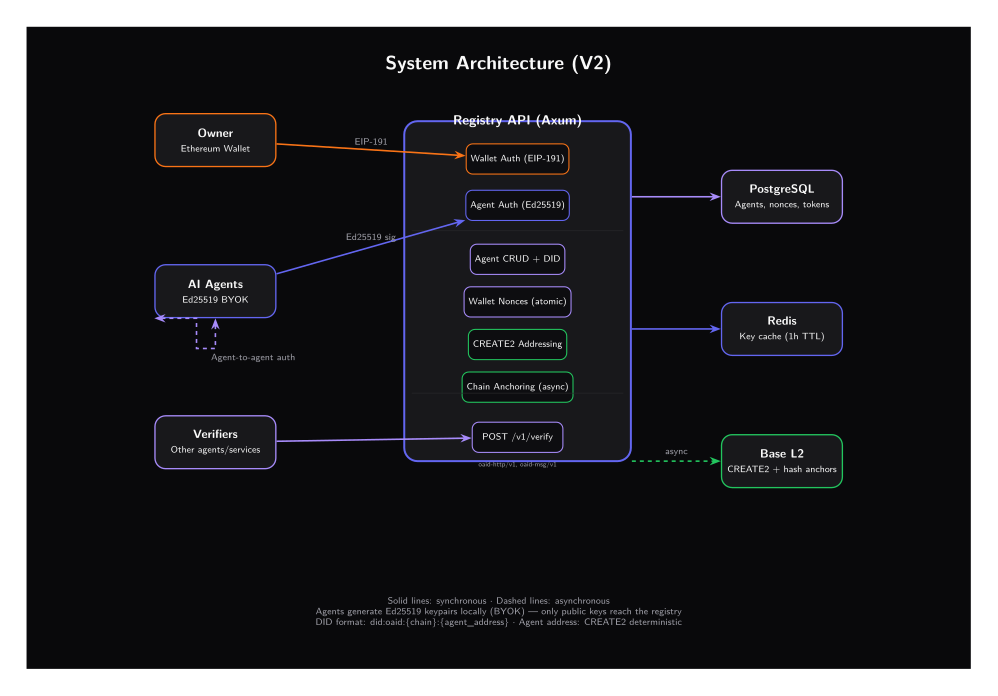
System architecture
The registry supports wallet auth (EIP-191). Agents register with BYOK (bring your own key), and identity hashes are anchored on Base L2 asynchronously via CREATE2. All lookups are cached in Redis.
The system has two layers: a fast centralized registry for everyday lookups (< 1ms), and a blockchain anchor for permanent, tamper-proof proof that an identity was registered. You get the speed of a database with the trust guarantees of a blockchain.
Two-layer
trust model.
Fast centralized reads with decentralized on-chain anchoring. The best of both worlds.
Owner authenticates via wallet (EIP-191) to prove identity. Agent generates keys locally and sends only the public key. DID + public key + verified owner stored in Postgres, then asynchronously anchored on Base L2.
Public-key lookups hit Redis cache first (1h TTL), then Postgres. Sub-millisecond verification with no chain interaction needed.
Only keccak256 hashes stored on-chain (~96 bytes per agent). Full data lives off-chain. Registration costs < $0.01 on Base L2.
Base is an Ethereum Layer 2 network built by Coinbase using the OP Stack. Think of Ethereum mainnet (L1) as a congested highway — Base (L2) is a fast lane built alongside it that periodically settles back to L1 for security. On-chain writes cost < $0.01 (vs $5–50 on L1), blocks confirm in ~2 seconds, security is inherited from Ethereum, and the Coinbase ecosystem ensures long-term reliability. Day-to-day verification never touches the chain — it happens locally in < 0.1ms. The chain is only used as a permanent, tamper-proof receipt of registration.
DID format
specification.
Each agent gets a globally unique W3C DID derived from a CREATE2 address — available instantly, anchored on-chain asynchronously.
oaid-http/v1\n{METHOD}\n{CANONICAL_URL}\n{SHA256(body)}\n{timestamp}\n{nonce}X-Agent-DID, X-Agent-Timestamp, X-Agent-Nonce, X-Agent-Signature.oaid-msg/v1\n{type}\n{id}\n{from_did}\n{sorted_to}\n{ref}\n{ts}\n{expires}\n{SHA256(body)}Built for the
agent economy.
From API authentication today to cross-platform reputation tomorrow.
API call authentication
Agent signs every API request. The receiving service verifies the caller's identity in < 0.1ms — no shared secrets, no API key leaks.
Cross-agent communication
Two agents exchange signed messages and verify each other's identity through the public registry. Trust without prior introductions.
MCP server authentication
Agents sign every tool call to MCP servers with their DID. The server verifies who's calling, controls which tools each agent can access, and logs an auditable trail — no shared API keys needed.
Usage attribution & billing
Every request is cryptographically signed. Attribute usage to specific agents for accurate billing and audit trails.
Sybil & spoofing prevention
On-chain identity anchoring makes it costly to create fake agent identities. Detect and block impersonation attacks.
Cross-platform reputation
An agent's identity and track record follow it across platforms. Build trust scores that are portable and verifiable.
Regulatory compliance
Immutable on-chain records provide the audit trail regulators need. Prove which agent did what, when, with cryptographic certainty.
Install in one line.
Three languages.
Production-ready libraries for the languages most agents are written in. All SDKs share the same protocol, the same DID format, and the same on-chain registry.